Technical Project Portfolio

A forward-looking repository of infrastructure builds, data & analytics, CRM engineering, conversational AI systems, and web content all drawn directly from deployments and consulting work I’ve personally delivered.


View GitHub
Portfolio visual
Impact Snapshot
  • 500+ users standardized imaging
  • 30+ O365 org migrations
  • 100+ Pentaho analytics demos
  • 95+ production-grade bots

Overview

The following sections showcase hands-on technical work I’ve personally created and delivered from CRM development to conversational AI. These projects highlight a wide spectrum of technical capabilities I’ve worked with in real-world deployments and consulting engagements. Click through to explore initiatives that represent both depth and variety. This is a curated collection, part of a larger body of work, and it will continue to grow as I complete new projects. Check back often to see the latest additions.

Multichannel assistants with intent design, secure API integrations, escalation paths, and analytics. Each bot below includes objective, impact, and key technical steps.

Z Bank Conversational Bot

Objective: Account opening, credit applications, and lead capture while meeting KYC requirements.

  • Intent library (KYC, account types, eligibility).
  • Core-banking API integration; PII guardrails and audit trails.
  • Escalation to agent + analytics for containment & deflection.
ASCAP Support Bot

Automated licensing Q&A; member support; reduced manual volume ~30%.

  • FAQ ingestion; intent tuning for licensing verbs.
  • Membership flows; human handoff when confidence is low.
Fraud & Banking Resolution Bot
  • Structured capture of disputed transactions with verification steps.
  • Case creation & routing to fraud ops with SLA timers.
  • Step-by-step progress updates and status subscription.
Pest Control Bot
  • Pest type, urgency, and location flows.
  • Calendar booking integration; technician dispatch alerts.
Internal HR Bot
  • Benefits/PTO/payroll intents; employee context memory.
  • Escalation to HR for policy exceptions.
Smart Banking Assistant
  • Balances, transfers, statements; disambiguation and verification.
  • Secure APIs; audit logs; rate-limiting and abuse prevention.
Utilities Energy Assistance Bot
  • Eligibility intake; validation vs program rules and income thresholds.
  • Case generation + CRM sync; empathetic tone & accessibility.
Hard Drive Recommendation Bot
  • Sequential questioning (capacity, speed, budget, interface).
  • Decision-tree mapping to catalog SKUs; upsell/cross-sell logic.
Thermos Retail Assistant
  • Parts/specs/warranty inquiries; document retrieval from CMS.
  • Routed claims when documentation uploaded; status tracking.
Retail Stylist Bot
  • Preference intake; real-time styling metadata and recommendations.
  • Outfit assembly with accessory upsells; cart handoff.
AI

AI Generated Content & Media

Generative AI applications in enablement and storytelling, blending text, voice, video, and avatars to create compelling narratives and training materials.

Descript AI Content Generation (2025)

Leveraged Descript’s text-to-voice and avatar features to produce enablement content for LivePerson. Transcript-based editing workflow streamlined production for both technical and non-technical audiences (~60% faster).

  • Generative voice cloning and video avatars
  • Transcript-based editing for rapid iteration
  • LMS distribution with analytics

LTX Studio Pitch Deck Video (2025)

Created a generative video from still images for LivePerson’s Pitch Deck Contest. Won first place by demonstrating cutting-edge AI storytelling capabilities.

  • Image-to-video generation workflows
  • Custom script and storyboarding
  • Award-winning output used in executive presentations
CRM

CRM Development

Salesforce engineering and process automation to streamline operations, billing, and volunteer engagement.

Salesforce Invoice Automation

Automated invoice creation using contracts and ticket hours; boosted billing efficiency by 50%.

  • Custom objects for Contracts & Ticket Hours
  • Scheduled monthly invoice generation & emailing
  • Ticketing system integration & finance enablement

Salesforce Volunteer Management

Volunteer lifecycle in Salesforce — requirements to deployment, improved scheduling & engagement.

  • Volunteer, Assignment & Schedule data model
  • Automation for reminders & communications
  • Reporting dashboards for coverage & impact
SF

Salesforce Admin Experience

These Salesforce capabilities are a combination of a variety of customer issues resolved for consultancy clients, grouped by the functional areas required to solve each request.

Flow Automation
click to expand

Objective: Automate repetitive business processes and enforce SLAs.

Outcome: Faster sales/service cycles, fewer manual errors.

  • Auto-update Account is Live state via flow (checkbox → picklist).
  • Email Case Owner 3 days after Awaiting Customer Reply.
  • Auto-create Renewal Opportunities 90 days pre-expiration.
  • Slack notifications: Closed Lost, Win Wires (Original/Renewal/Add-on).
  • Lead Auto Assignment by State + owner notification fixes.
  • Auto-assign new Cases to Support queue; 30-day no-touch alerts.
  • Automated Implementation Tracker milestone updates.
Custom Objects
click to expand

Objective: Extend data model for risk, health, and implementation operations.

Outcome: Structured, reportable workflows.

  • Termination Risk Events (notes, status) on Account.
  • Account Health survey object with question bank.
  • Implementation Tracker enhancements: Health, At-Risk Reason, Live state.
  • Service Facility object with address compound field.
  • Implementation form tables for granular milestones.
Validation Rules
click to expand

Objective: Enforce data integrity & compliance.

Outcome: Clean input, reliable reporting.

  • Required on Closed Lost: Loss Reason, Date, Description, New EMR.
  • Prevent Implementation Stage = Complete without AM/Support Handoff Date.
  • New EMR required when Original Contract status is Cancelled.
  • Previous EMR duplication checks.
  • Case required fields vary by Status.
Field Dependencies
click to expand

Objective: Context-aware forms that reduce cognitive load.

Outcome: Faster entry, fewer mistakes.

  • Task Department → Task Type dependent picklists.
  • Account is Live changed to picklist (Live / Partially Live / In Implementation).
  • Implementation Category auto-derived from Employee Count (Small/Medium/Enterprise).
  • Account Health picklist: removed In Implementation, added Deferred Contract.
  • Modules Included (Account) visible on Contacts for campaign tooling.
User Permissions & Security
click to expand
  • Only Sales can edit Opportunities; only Leadership can set Closed Won.
  • Mobile editing controls on Implementation Tracker.
  • Case owner default changed from Account Owner → CPS1.
Page Layout Modifications
click to expand
  • Fields surfaced: First Opp Close Date; Initial Bill Date & Class (Opp → Product); Contract Expiration (Contract → Opp & Account).
  • Objects on Account layout: Termination Risk Events, Account Health.
  • UI streamlining: Tasks to full-page, Activity Log on Implementation Tracker, Activity History moved right.
  • Case view cleanup & Implementation Tracker page adjustments.
Email Templates & Notifications
click to expand
  • Default Case “From” → Support inbox.
  • Accounting notified on Lab Setup Case close.
  • Closed Won emails show Total MRR (not Amount).
  • WinWire variants: Original, Renewal, Add-on; CPS1/2 label updates.
  • Resolved duplicate case assignment emails.
Reports & Dashboards
click to expand
  • Parent Account rollup report (single line per parent).
  • Survey reporting with case-level fields (Case #, Account, Type, Owner, Component).
  • Dashboard filtering by Account; add-on vs churn signals.
  • Total Users rollup fix; contract expiration tracking.
Surveys & Customer Feedback
click to expand
  • Auto-send CSAT surveys on Case closure.
  • Filters to exclude certain Account statuses.
  • Updated survey fields & questions; added per-ticket CSAT.
Miscellaneous Enhancements
click to expand
  • Case After Save error fix; duplicated Current EMR cleanup.
  • Customer Value Score; Account Age in Months formula.
  • LinkedIn URL field as hyperlink; Products for one-time setup fees.
  • Contract expiration automation fixes; Modules Included surfaced on Contacts.
IT

Network & Infrastructure

Deployment

MDT/WDS Server Setup & Deployment

Imaging automation across 4 global offices for 500+ users; ~2h → 20m per device.

MDT/WDS Server Setup and Deployment

Date Completed: Nov 2016 – Dec 2016

Objective: Automate workstation imaging and deployment across global offices.

Outcome & Impact: Reduced imaging time from ~2 hours to 20 minutes per device. Enabled standardized deployments for 500+ users across 4 sites.

Technical Steps Taken:

  • Installed WDS and MDT on Windows Server 2012 R2.
  • Built deployment task sequences for OS and applications.
  • Configured DFS replication to sync deployment shares across four offices.
  • Implemented PXE boot rules at each gateway for localized booting.
  • Validated process with IT teams and created documentation.
Office 365

Office 365 Migrations (30 orgs)

Hybrid migration playbooks, mailbox moves, DNS cutovers, and staff enablement.

Office 365 Migrations (30 orgs)

Date Completed: Mar 2013 – Sep 2013

Objective: Transition nonprofits from on-prem Exchange servers to Office 365.

Outcome & Impact: Migrated 30+ organizations successfully, improving uptime and eliminating server maintenance overhead.

Technical Steps Taken:

  • Evaluated Exchange environments and mail server sizes.
  • Created migration playbooks for each organization.
  • Configured hybrid Exchange where required.
  • Migrated mailboxes in staged waves.
  • Updated DNS records and trained users.
Server room

macOS Server (Open Directory)

Central auth + file sharing for 1,000+ users in education environment.

macOS Server (Open Directory)

Date Completed: Mar 2009 – Apr 2009

Objective: Deploy centralized server for authentication and file sharing in a school environment.

Outcome & Impact: Supported 1,000+ student and staff logins with Open Directory and shared applications.

Technical Steps Taken:

  • Installed macOS Server.
  • Configured Open Directory for centralized authentication.
  • Created and secured file shares with proper permissions.
  • Enabled app distribution across labs.
  • Tested load and trained administrators.

End-to-end demos: PDI (KTR/KJB), Kafka, Hive/Impala, Mondrian OLAP, CDE dashboards. Click to expand each project.

Metadata Injection – Self Service Onboarding

Objective: Dynamic onboarding for multi-customer CSV schemas via Metadata Injection.

Outcome: Faster onboarding; minimal dev changes.

  • Sample CSVs (Acme, HiTech, WillCo) + file_type_fields.csv registry.
  • PDI templates injected at runtime; t_file2hdfs.ktr to stage in HDFS.
  • Mondrian exports; PUC dashboards for validation.
AEL Spark Demo

Objective: Run PDI on Spark via Adaptive Execution Layer.

Outcome: Demonstrated horizontal scaling vs local engine.

  • Datasets: zipcode.csv, zipcodestores.csv, products.csv.
  • Transform compatibility tweaks; runtime benchmarks; QA dashboards.
Credit Card Fraud Analysis

Objective: Prepare scalable pipelines for fraud feature engineering.

Outcome: Repeatable HDFS prep; faster model iteration.

  • Jobs for ingestion/cleansing; suspicious-pattern tagging.
  • Cleanup & Setup Directories on HDFS.kjb for idempotent runs.
SFDC Customer 360

Objective: Build a 360° customer profile for segmentation.

  • Load customers.csv; normalize demographic & registration data.
  • Mondrian cube for cohorts; segmentation dashboards.
Candy Demo (CPG Analytics)
  • Transforms: cpg_sales.ktr, cpg_sentiment.ktr, cpg_keywords.ktr, Create_Date_Dimension.ktr.
  • Mondrian for SKU/channel/region; promo ROI dashboards.
London Air Quality
  • API ingest via t_get_air_quality_data_ms_mf_inline.ktr; time dims with t_create_month_day_tables.ktr.
  • Job orchestration (London Air Quality Job.kjb); OLAP & dashboards.
JSON Getting Started
  • Transforms: JSON_Data_Processing.ktr, JSON_to_CSV.ktr, lab & DW enrichment flows.
  • Patterns for JSON → CSV → warehouse with QA dashboards.
R Plugin Integration
  • Datasets: iris.csv, pendigits.csv, diamonds_test.csv.
  • Invoke R models; persist predictions; visualize in PUC.
WEKA Banking Demo
  • Train/test split (BankTrain.csv/BankTest.csv); scoring transform t_weka_banking_scoring.ktr.
  • Risk dashboards for explainability.
Tesla Motors Data Mashup
  • Load financial_demo.zip; schema financial.equity_quotes_tweets_live.xml.
  • Overlay sentiment vs price; anomaly callouts.
Manufacturing Insights – Conveyor Belts
  • Kafka ingest; vibration/RPM preprocessing; predictive KPIs.
  • Mondrian cubes; dashboards with component drilldowns.
Financial Services Demo
  • CTools + demo packages; account/portfolio OLAP; KPI dashboards.
IoT_Class_RPM (Maintenance Required?)
  • Normalize RPM; predictive outcomes; Mondrian model + dashboards.
CPG_Pentaho
  • Sales/logistics integration; SKU/vendor cubes; promo performance.
Streamlined Data Refinery (Hive/Impala)
  • Hive/HDFS ingestion (SDR_GeoLocation_HDFS.ktr), Impala jobs.
  • Postgres bulk loads; OLAP dimensions: Phone, Geo, Time.
IoT Vibration Prediction
  • LogitBoost training (t_logitBoost_trainModelFR.ktr); ARFF exports; prediction pipeline jobs.
cde.zip (Bud1 Components)
  • CDE dashboards; reusable components; dev time reduced ~30%.
WC

Web Design & Online Content

Projects in web presence, consultancy branding, and learning systems for organizations.

Portfolio site

Portfolio Website (2025) · franklindelacruz.com

HTML from scratch, styled with Tailwind; hosted on GitHub & published via Cloudflare. Built to highlight career projects; completed in two days (Sept 2025).

Step-by-step
  • Plan information architecture: sections (Overview, CRM, Infra, Pentaho, Conversational AI, AI, Web & Content, Media).
  • Initialize repo (index.html, assets/, .gitignore); configure GitHub Pages branch.
  • Build semantic HTML skeleton; add Tailwind CDN; set global typography and smooth scroll.
  • Implement sticky nav with anchors; add “Home” link and brand link to /index.html.
  • Create hero with gradient background and responsive image; add impact callout card.
  • Design content cards for each section using grid, rounded corners, and soft shadows.
  • Add light/dark support: system-pref + toggle; persist preference in localStorage.
  • Optimize assets: compress images; use alt text; lazy-load where appropriate.
  • SEO: set title/description, logical heading order, link to custom domain via Cloudflare DNS (A/CNAME) + SSL.
  • Accessibility pass: color contrast (WCAG AA), focus states, skip-to-content semantics.
  • Performance: minimize DOM, prefer system fonts + Inter, defer non-critical JS; measure in Lighthouse.
  • Deploy: connect custom domain on Cloudflare; set caching rules and security headers.
  • Post-launch: add repo link placeholders in each section; create print stylesheet (roadmap).
Consultancy site

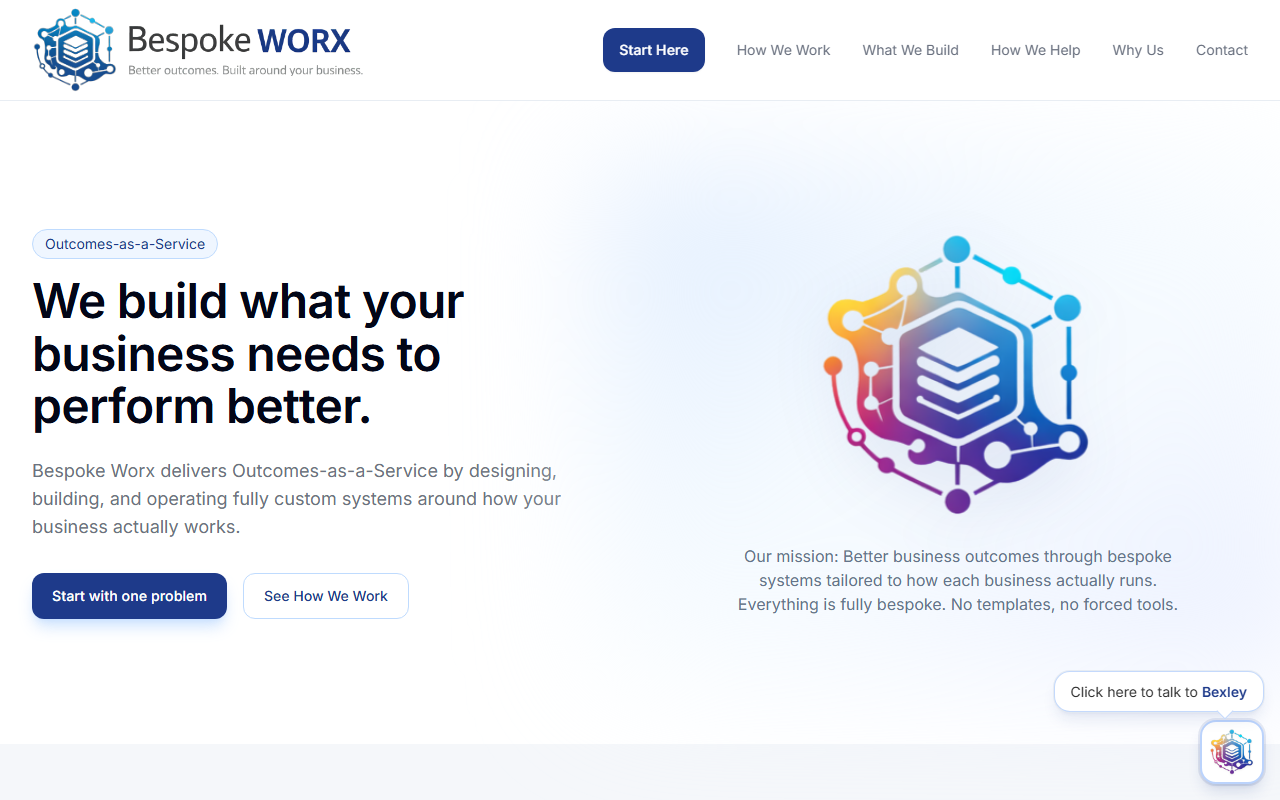
DLC Consultancy (2024) · dlcconsultancy.com

WIX site with SEO, services pages, lead capture, and light blogging for thought leadership.

Step-by-step
  • Select Wix template optimized for consulting; configure theme (color, typography, spacing).
  • Define site map: Home, Services, Case Studies, Blog, Contact.
  • Create service pages with clear CTAs and contact forms; enable reCAPTCHA & spam filtering.
  • Integrate Calendly for discovery calls; set timezone & buffers.
  • Implement lead capture: newsletter signup → mailing list with double opt-in.
  • SEO: page titles/meta, open graph images, 301 redirects, custom domain mapping.
  • Analytics: connect Google Analytics 4 and Search Console; configure event goals.
  • Performance: compress hero media, defer third-party scripts, image lazy-loading.
  • Compliance: cookie banner, privacy policy, and contact consent language.
  • Publish and monitor: uptime checks, form submission alerts to Slack/email.
Drupal LMS

YMCA South Palm Beach Florida Enablement Portal (2015)

Drupal LMS on AWS: modular content, media workflows, role-based access, and ongoing maintenance.

Step-by-step
  • Requirements intake with YMCA staff; define personas (Admin, Instructor, Staff).
  • Provision AWS (EC2 + RDS + S3); configure VPC, security groups, IAM roles.
  • Install Drupal; enable modules for LMS (e.g., quiz, media, views) and role-based permissions.
  • Design content types: Courses, Modules, Assessments, Resources; create taxonomies.
  • Build page templates and navigation; add search and resource filters.
  • Implement media pipeline: S3-backed storage; transcoding presets; responsive image styles.
  • Authentication & authorization: roles, granular permissions, password policies.
  • Analytics & reporting: completion tracking, quiz results exports for leadership.
  • Backups & DR: automated snapshots, retention policy, restore runbooks.